Home Office Setup Guide 2026: Complete Guide
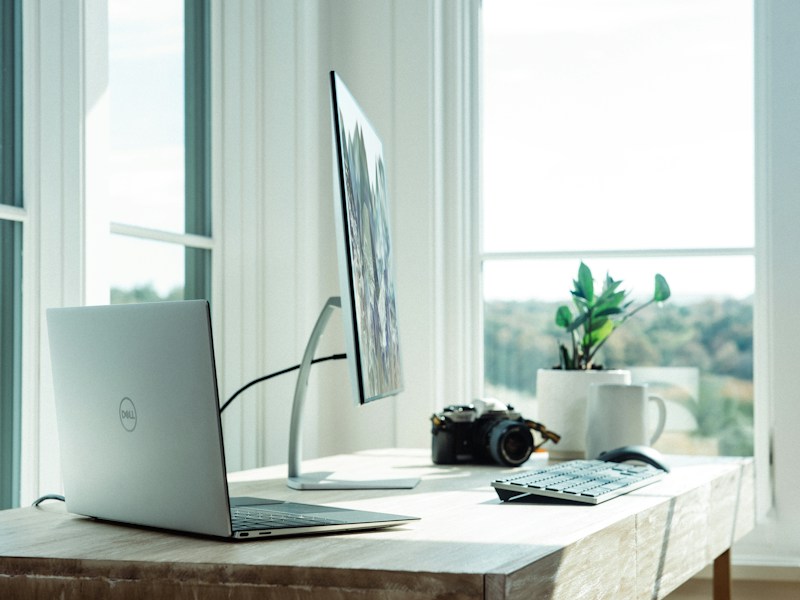
The permanent shift to remote and hybrid work has made the home office a critical space that directly impacts career performance, physical health, and mental well-being. What began as a temporary pandemic arrangement has become a permanent feature of professional life for 35% of American workers, with 72% of companies planning to maintain remote work options indefinitely. A poorly configured home office leads to chronic back pain, eye strain, decreased productivity, and blurred work-life boundaries that damage both career performance and personal relationships. Conversely, a thoughtfully designed workspace improves focus, reduces physical discomfort, and creates clear mental separation between work and personal time. This guide covers every element of the ideal home office—from furniture and equipment to lighting, acoustics, and daily routines—to help you create a workspace that supports sustained professional success without sacrificing health or happiness.
Key Takeaways
- Ergonomic setup is non-negotiable—proper chair and desk positioning prevents chronic pain and injury
- Dual monitors increase productivity by 20-30% for most knowledge workers
- Natural light exposure during work hours improves mood, sleep quality, and cognitive function
- Investing in quality audio (microphone, headphones) is more important than video quality for remote meetings
- Dedicated work space—even a corner desk—creates mental separation between work and personal life
- Regular movement breaks every 30-60 minutes prevent the health damage of prolonged sitting
Ergonomic Furniture: The Foundation of Productivity
Ergonomic furniture is the single most important investment in your home office, directly affecting your physical health, comfort, and ability to work for extended periods without pain. The average knowledge worker sits for 6-8 hours daily, creating enormous stress on the spine, hips, and neck that leads to chronic musculoskeletal conditions if not properly supported. A quality ergonomic chair distributes body weight evenly, maintains the natural S-curve of the spine, and allows micro-adjustments throughout the day to prevent the stiffness and pain associated with static sitting positions.
The Herman Miller Aeron ($1,395) remains the gold standard for ergonomic seating, with its PostureFit SL back support system that automatically adjusts to your body's movements. The mesh construction promotes airflow that prevents the heat buildup common with foam-cushioned chairs, and the adjustable arms, lumbar support, and seat depth accommodate body types from 5'0" to 6'7". The Aeron's 12-year warranty reflects its build quality and durability, making the per-year cost comparable to cheaper chairs that need replacement every 2-3 years.
For budget-conscious buyers, the Autonomous ErgoChair Pro ($499) provides 80% of the Aeron's ergonomic benefits at one-third the price. The adjustable lumbar support, headrest, and 5 recline positions accommodate different working postures throughout the day. The mesh back and seat prevent heat buildup, while the waterfall seat edge reduces pressure on the back of the knees that causes numbness during extended sitting. The ErgoChair Pro's build quality doesn't match the Aeron's longevity, but it provides adequate support for 5-7 years of daily use.
Standing desks complement ergonomic chairs by allowing position changes that reduce spinal compression and improve circulation. The ideal setup alternates between sitting and standing every 30-60 minutes, with the desk height adjustable so your elbows rest at 90 degrees in both positions. Cable management trays, monitor arms, and desk organizers keep the workspace clutter-free and reduce visual distractions that fragment concentration. A clean, organized desk promotes clearer thinking and reduces the cognitive load that comes from searching for documents, pens, or accessories during focused work sessions.
Technology and Equipment Essentials
The right technology setup dramatically impacts work efficiency, meeting quality, and professional impression. Dual monitors are the single most impactful upgrade for knowledge workers, increasing productivity by 20-30% for tasks that require referencing multiple documents, comparing spreadsheets, or maintaining video calls while working. The second monitor eliminates the constant window-switching that fragments focus and slows workflow. A 27-inch 4K monitor provides sufficient screen real estate for split-screen work without the neck strain caused by larger ultrawide displays.
The LG 27UK850-W ($399) offers the best combination of resolution, color accuracy, and connectivity for home office use. The 4K resolution provides crisp text that reduces eye strain during extended reading, while the HDR10 support ensures accurate color representation for design work. The USB-C connectivity charges compatible laptops while transmitting video and data through a single cable, reducing desk clutter. The monitor's height-adjustable stand and VESA compatibility allow mounting on ergonomic monitor arms for optimal positioning.
Audio quality matters more than video quality for remote meetings—colleagues tolerate grainy video but immediately notice distracting background noise, echo, and poor microphone quality. The Blue Yeti X ($150) provides broadcast-quality audio capture with four pickup patterns that adapt to different recording situations. The built-in headphone jack enables real-time monitoring, and the mute button prevents embarrassing hot-mic situations. For video quality, the Logitech Brio 4K ($180) delivers excellent low-light performance and auto-framing that keeps you centered even when moving.
Keyboard and mouse selection significantly impacts typing comfort and long-term hand health. The Logitech Ergo K860 ($130) splits the keyboard into two angled sections that reduce wrist pronation—the inward bending that causes carpal tunnel syndrome. The cushioned palm rest supports the wrists during typing breaks, and the wireless connection eliminates cable clutter. Pair with the Logitech MX Master 3S ($100) mouse, which contours to the natural hand position and provides customizable buttons that accelerate common workflows. These input devices are not luxuries—they are essential investments in hand health for anyone who types for 6+ hours daily.
Lighting, Acoustics, and Environmental Design
Lighting profoundly affects mood, energy levels, and visual comfort during work hours. Natural light is superior to artificial lighting for virtually every measurable outcome—better sleep quality, higher vitamin D levels, improved mood, and reduced eye strain. Position your desk perpendicular to windows to avoid direct sunlight on your screen while maximizing ambient daylight exposure. North-facing windows provide the most consistent natural light without harsh direct sun that creates glare and hot spots on monitors.
Supplement natural light with a combination of ambient overhead lighting and task lighting that reduces shadows and eye strain. The BenQ ScreenBar ($110) mounts on top of your monitor and illuminates the desk surface without creating screen glare, using asymmetric optics that direct light downward rather than toward your eyes. The adjustable color temperature shifts from cool blue (5,000K) for focus-intensive work to warm amber (2,700K) for evening hours, supporting your circadian rhythm that regulates sleep quality and energy levels.
Acoustic treatment prevents the echo and background noise that degrade video call quality and fragment concentration. Dense foam panels, heavy curtains, and soft furniture absorb sound reflections that create hollow, echoing audio on calls. Position a bookshelf or cabinet behind your desk to break up sound waves that would otherwise reflect off the wall behind you. For persistent noise issues, the Sony WH-1000XM5 headphones ($349) provide industry-leading active noise cancellation that blocks external distractions during focused work sessions, while the built-in microphones deliver clear audio for calls when you need to communicate.
Daily Routines and Productivity Systems
The most effective home office setups combine physical workspace optimization with structured daily routines that maintain focus and prevent the work-from-home trap of constant availability. Start each workday at the same time, complete your morning routine (including getting dressed in work-appropriate clothing), and physically walk to your office space to create a psychological transition from personal to professional mode. This ritual triggers your brain to shift into work mode more effectively than simply opening your laptop in bed or on the couch.
The Pomodoro Technique—25 minutes of focused work followed by 5-minute breaks—provides structure that prevents both burnout and procrastination. During breaks, stand up, stretch, walk around, and look at objects 20+ feet away to rest your eyes from screen focus. The 20-20-20 rule (every 20 minutes, look at something 20 feet away for 20 seconds) specifically prevents digital eye strain that causes headaches and blurred vision. These micro-breaks maintain cognitive performance throughout the day while preventing the physical damage of prolonged static postures.
End each workday with a shutdown ritual that creates clear boundaries between work and personal time. Close all work applications, review tomorrow's priorities, and physically leave your office space. Turn off work notifications on your phone to prevent the "always on" mentality that leads to burnout. Research shows that workers who maintain clear work-life boundaries report 25% higher job satisfaction and 18% better sleep quality than those who blend work and personal time throughout the day.
Why This Matters in 2026
Home office quality directly impacts career success in a remote-first economy where physical presence no longer distinguishes productive workers from distracted ones. Managers increasingly evaluate remote employees based on output quality, meeting performance, and collaborative effectiveness—all of which depend on having a workspace that supports sustained focus and professional communication. A poorly configured home office signals lack of professionalism and commitment, while a well-designed workspace demonstrates investment in career success that managers notice and reward.
The health implications of home office setup extend far beyond immediate comfort. The Bureau of Labor Statistics reports that musculoskeletal disorders account for 30% of all workers' compensation claims, with improper workstation setup being a primary cause. Chronic back pain, carpal tunnel syndrome, and repetitive strain injuries develop gradually over months and years, often becoming debilitating before workers recognize the connection to their workspace setup. Investing $2,000-3,000 in quality ergonomic furniture and equipment prevents medical expenses that can exceed $10,000 annually for chronic conditions requiring surgery, physical therapy, and ongoing treatment.
Mental health benefits of a proper home office setup are equally significant. The blurring of work and personal space contributes to anxiety, depression, and burnout that affect 67% of remote workers at some point. Dedicated workspace creates physical boundaries that support psychological separation between professional and personal life, reducing the stress of constant availability and enabling genuine rest and recovery during off-hours. As remote work becomes permanent for millions of professionals, investing in home office quality becomes an investment in long-term mental health and career sustainability.
Frequently Asked Questions
How much should I spend on a home office setup?
Budget $2,000-3,000 for a complete home office setup that includes a quality ergonomic chair ($500-1,500), standing desk ($300-800), dual monitors ($400-800), and essential accessories (keyboard, mouse, lighting, $200-400). This investment pays for itself through prevented medical expenses, increased productivity, and tax deductions (the home office deduction allows $5 per square foot up to 300 square feet, or $1,500 annually). Start with the chair and desk—these have the greatest impact on daily comfort and long-term health.
Do I need a separate room for a home office?
A separate room provides the best work-life separation and minimizes distractions, but it is not strictly necessary. A dedicated corner with a desk, chair, and proper lighting can function effectively as a home office if you maintain consistent work hours and boundaries. The key is physical and mental separation from personal space—working from the couch or bed creates blurred boundaries that harm both productivity and sleep quality. If a separate room is impossible, use visual cues like a curtain or room divider to create psychological separation.
What is the ideal desk size for a dual-monitor setup?
A desk width of 60-72 inches (5-6 feet) accommodates dual 27-inch monitors with comfortable spacing and room for keyboard, mouse, and accessories. Desk depth should be at least 30 inches to position monitors at arm's length (20-26 inches from your eyes) without crowding. L-shaped desks provide the most workspace, separating computer work from document review or writing tasks. For limited spaces, monitor arms free up desk surface by mounting screens on articulated arms that adjust height and angle.
How do I reduce eye strain from screen time?
Follow the 20-20-20 rule: every 20 minutes, look at objects 20+ feet away for 20 seconds to rest your eye muscles. Position monitors at arm's length (20-26 inches) with the top of the screen at or slightly below eye level. Enable blue light filters (f.lux, Night Shift) that reduce eye strain during evening work. Adjust monitor brightness to match your room lighting—screens that are brighter or dimmer than the surrounding environment force your eyes to constantly adjust, causing fatigue. Blink frequently during screen work, as reduced blink rate causes dry eyes and irritation.